Post Page Advertisement [Top]

Npc Recruitment Portal 2 Simple Method To Edit Application Status

Npc Recruitment Portal 2 Simple Method To Edit Application Status

npc recruitment portal – Are there any changes you would like to make to your National Population Commission (NPC) application? If you answered “yes,” then you should read this material. In this post, we’ll take you step-by-step through the process of amending your NPC application.

Some applicants submitted their resumes after their first training had concluded, while others have moved since submitting their previous application; in these cases, they can modify their resumes to change their job title to “enumerator” or “supervisor,” as well as their new location.

If your profile is accurate, rest certain that you will be accepted before or during the NPC training; but if it contains an error, only God can help you.

Hence, follow the instructions below if you need to make any modifications in addition to updating your NIN.

How To Edit Your NPC Application On The NPC Portal

Check out the NPC portal: Start by opening your favorite web browser and going to the NPC portal. Make sure your internet connection is reliable.

To begin an application, click the “Start Application” button on the portal’s homepage after you have logged in.

Once you’ve clicked the “Start Application” button, choose “Resume Application” from the selection menu that displays.

Fill in your NPC Application ID: Fill out the field provided with your NPC application ID. Your application ID can be found in the confirmation email you get after submitting your application.

Following the entry of your application ID, select “Proceed” to move forward.

Edit the URL: Once you’ve clicked on “Proceed,” the URL in your web browser will change.

To edit your details, simply add “/prev” (without quotes) after the “ng” in the URL. For example, if the URL is “https://npcregistration.org.ng/apply/123456”, you should edit it to read “https://npcregistration.org.prev/apply/123456”. This will take you to the page where you can edit your personal details.

Click here  to get this book
Or Use This Another Simple Method To Edit NPC Application,

  • How to edit your details on the NPC portal
  • Go to the NPC portal,
  • Click “Start Application,”
  • Select “Resume application”,
  • Enter your NPC Application ID,
  • Click “Proceed”
  • Edit the URL after you click on proceed, and put “/prev” without quotes after the URL where “ng” should be.

Make the necessary modifications to your personal information once you’ve reached the page where you can amend your details.

Changes to be submitted: After making the changes, carefully check them to make sure they are accurate. To save your changes, click the “Submit” button.

Use this Link to enter NPC application Portal https://2023censusadhocrecruitment.nationalpopulation.gov.ng


Read more ...

NIGERIAN NAVY RECRUITMENT 2023

Nigerian Navy

YOU ARE REQUIRED TO READ THE GUIDELINES UNTIL THE END BEFORE YOU BEGIN THE APPLICATION
Nigerian Navy
Read more ...

LIST OF APC, DPD THAT HAVE WON SO FAR

As the collation of the 2023 Governorship election continues across state in Nigeria, here is a list of result won and lost so far far by All Progress Congress (APC), the People's Democratic Party and others.
Read more ...

HOW TO FLASH DEAD ANDROID PHONE

4 Ways to Flash Dead Android Phone Safely
phone is considered to be dead when it becomes completely unresponsive and refuses to switch on. Similarly, an Android phone is said to be dead when it does not boot up. You may try to switch it on several times by pressing the power button but in vain. You will see no sign of the phone’s logo or anything like a welcome screen. The Android phone’s screen remains black and does not illuminate when you try to turn it on. Interestingly, even when you charge this dead device, it does not show that it is getting charged.

You can download a complete guide and the software here: https://paystack.com/buy/systemphone-management-hifcxa

Many people regard this as a battery issue and many think of it as a temporary software crash. There are users who also seem to believe that this is because of a virus attack. However, if you are looking for ways which tell you how to fix the dead Android phone, you must understand that a dead phone or device can be cured by flashing a custom firmware safely. If you are keen to know, how to flash a dead Android phone or how to flash dead Android phone using PC here are ways to help you.
Given below are three techniques to flash your Android phone safely depending upon which phone you are using. It may seem time-consuming and tedious, but we can assure you that it works. So, move ahead and read on to learn about flashing a new firmware your Samsung Galaxy, MTK Android and Nokia phone safely.

Part 1: How to flash Samsung Galaxy in one click?

Part 2: How to flash Samsung Galaxy dead phone with Odin?

Part 3: How to flash MTK Android dead phone with SP Flash tool?

Part 4: How to flash Nokia dead phone with Phoenix tool?

Part 1: How to flash Samsung Galaxy in one click

While you are worried about how to flash Samsung Galaxy instantly with a single click, Bem T- System Repair (Android) swiftly makes its way with a galore of options for you. This amazing tool from Wondershare can fix plethora of Android system issues such as crashing of apps, black screen of death, failed system update etc. Moreover, it can also get your device out of boot loop, unresponsive bricked Android mobiles as well as stuck at Samsung logo.

Step by step Tutorial
We are going to explain, how to flash dead Android phone using PC using Dr.Fone - System Repair (Android)

Note: Before you understand how to flash Dead Android phone, take a backup your data and then proceed to avoid any data loss.

Phase 1: Prepare your Android device

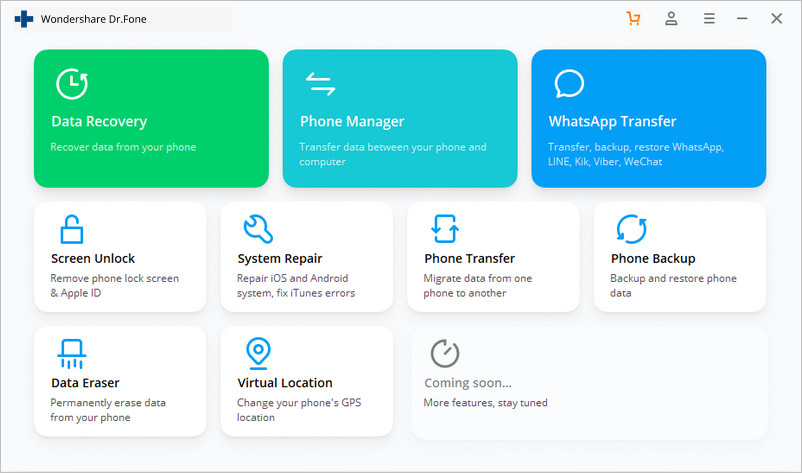
Step 1: Once you have downloaded and installed Dr.Fone, launch it. From the main menu, tap on the ‘System Repair’ and get your Android device connected to it.
how to flash Dead Android phone


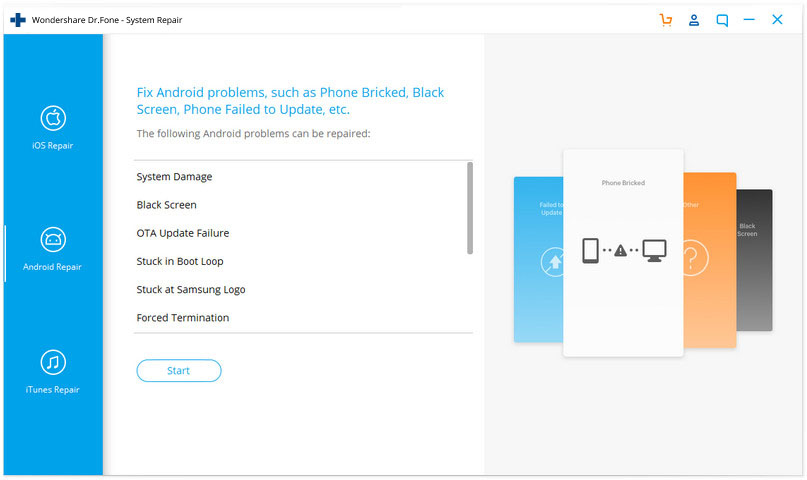
Step 2: Click ‘Android Repair’ from the available options, and then press the ‘Start’ button to fix Dead Android phone by flashing it.


android repair to flash dead phone

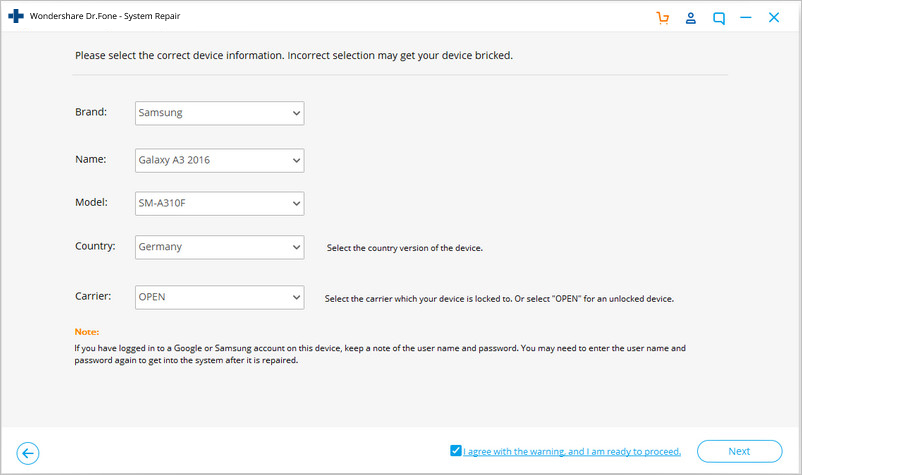
Step 3: On the device information screen, pick the appropriate device brand, name, model and other details followed by tapping the ‘Next’ button.


choose brand info

Phase 2: Put Android device in Download mode to start repair.
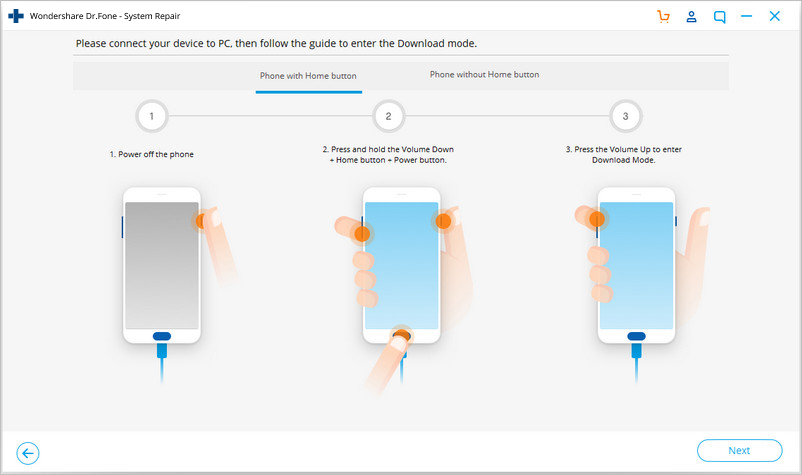
Step 1: It is essential to boot your Android device in Download mode prior to repairing.
  • If the device has a ‘Home’ button: Turn it off and then hold down the ‘Volume Down’, ‘Home’, and ‘Power’ buttons altogether for 5-10 seconds. Un-hold all of them and hit the ‘Volume Up’ button for entering ‘Download’ mode.
  • flash android with home key
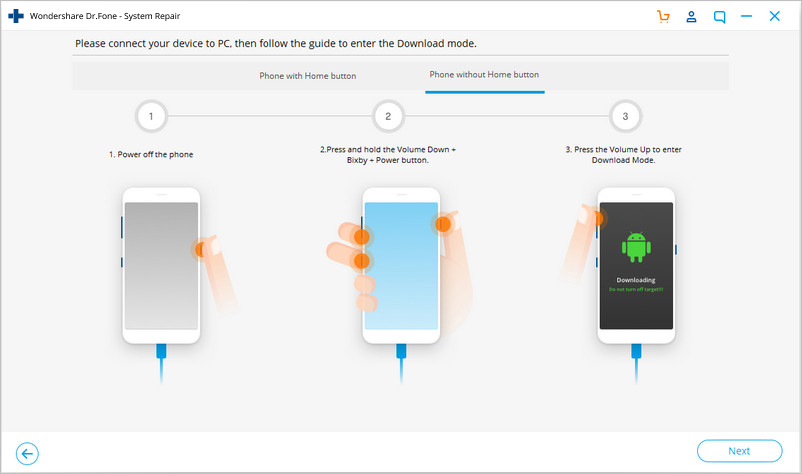
  • In the absence of a ‘Home’ button: Switch off the Android device and hold the ‘Volume Down’, ‘Bixby’, and ‘Power’ buttons for 5 to 10 seconds, then release them. Hit ‘Volume Up’ button for entering ‘Download’ mode.


flash android with no home key

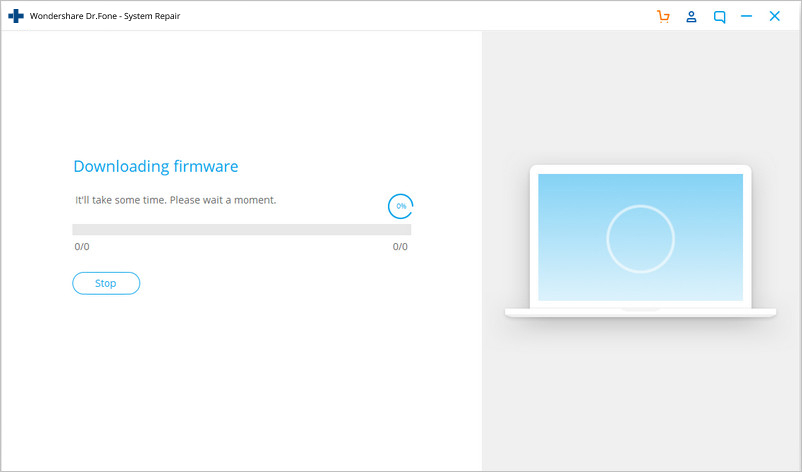
Step 2: Press the ‘Next’ button for initiating firmware download.


flashing samsung galaxy

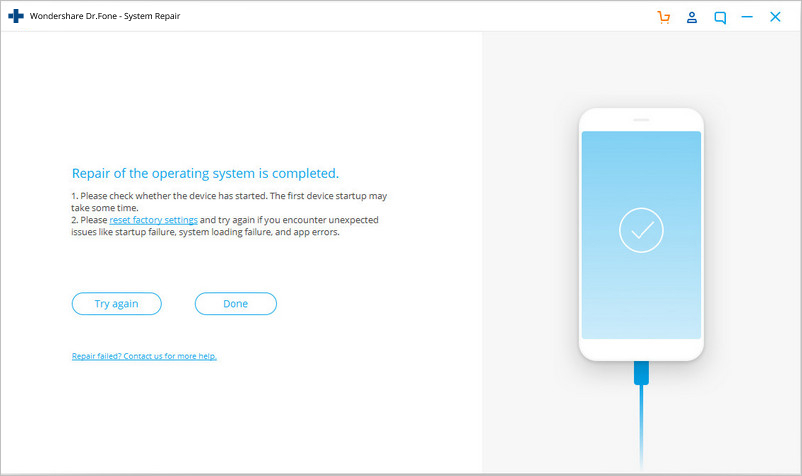
Step 3: Once the firmware gets downloaded and verified Dr.Fone - System Repair (Android) starts to flash your Dead Android phone. All the Android system issues will be fixed soon after.


dead android flashed

Part 2: How to flash Samsung Galaxy dead phone with Odin?

In this segment, we will learn how to fix the dead Android phone, i.e., Samsung Galaxy phones using Odin software. Odin is basically a software used internally by Samsung to generally unblock devices and perform a more utility based job, namely, flashing a new firmware in place of the old one. There are different variants available, so choose the one which is supported by your Galaxy phone. Here is a step by step explanation on how to flash dead Android phone (Samsung Galaxy) using Odin software.
Step 1: Install a driver software on the computer. You can find the best driver software for your device and PC on the official Samsung website. You may also download Samsung Kies on your PC. Once you have downloaded and installed the driver software, restart the PC.
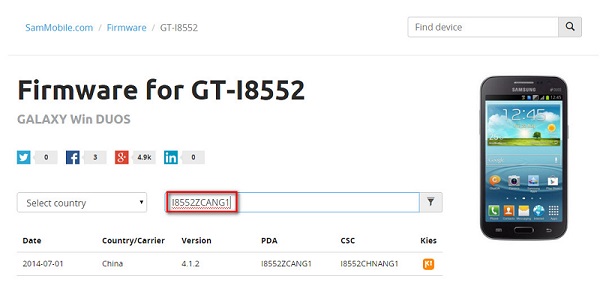
Step 2: Now download a suitable firmware for your device in the form of a zip folder which you can open and store on your desktop.
download suitable firmware
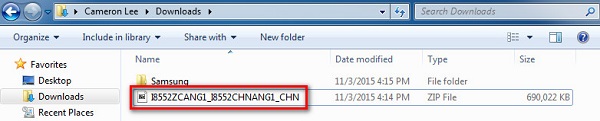
Make sure the file is .bin, .tar or .tar.md5 only as these are the only file types recognized by Odin.
firmware zip file
firmware md5 file
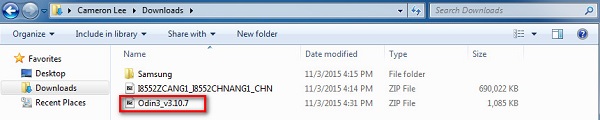
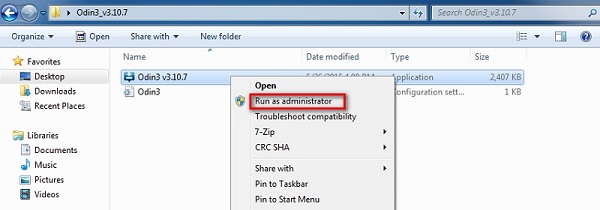
Step 3: In this step, download the latest version of Odin on your PC and move it to the desktop and then right click on the downloaded Odin file to select “Run as Administrator”.
download odin
run as administrator
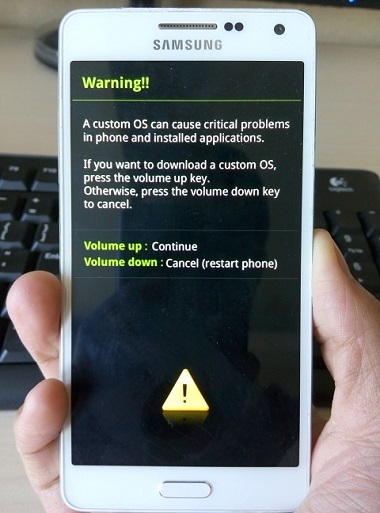
Step 4: Now boot your dead device to Download Mode by pressing the power, volume down and home button together. When the phone vibrates, release the power button only.
boot in download mode
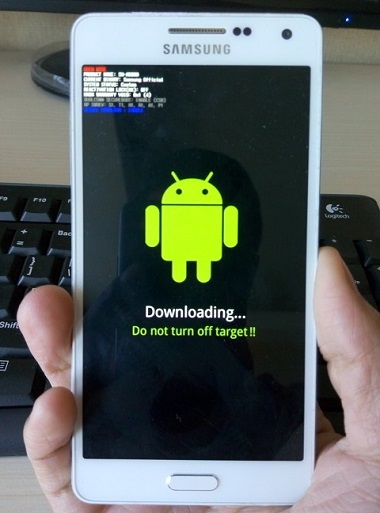
Step 5: Gently press the volume up button and you will see the Download Mode Screen.
android download mode
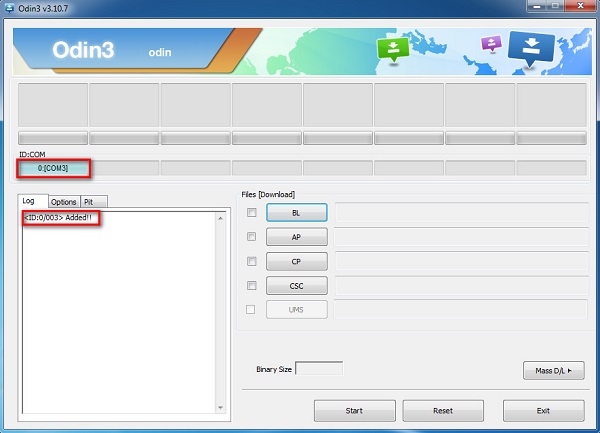
Step 6: Now you may use a USB to connect your device to the PC. Odin will recognize your device and in the Odin window you will see a message saying “Added”.
connect android device
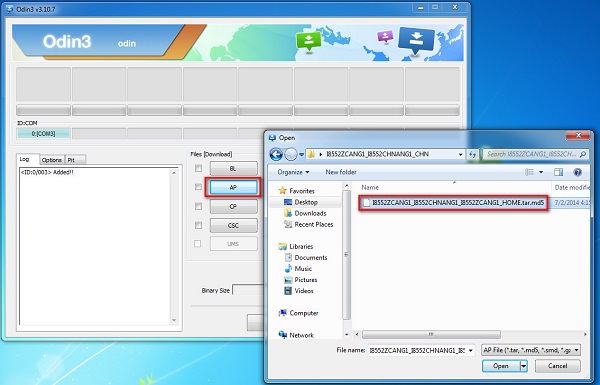
Step 7: In this step, find the tar.md5 file you downloaded by clicking on “PDA” or “AP” on the Odin window and then click “Start”.
open md5 file
Finally, once the flashing process is complete, your Samsung Galaxy phone will reboot and start normally and you may see a “Pass” or “Reset” message on the Odin window on the PC.

Part 3: How to flash MTK Android dead phone with SP Flash tool?

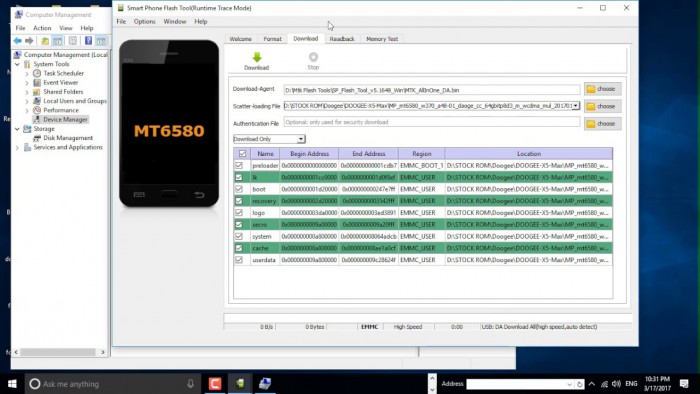
SP Flash tool, also know as SmartPhone Flash tool is a popular freeware tool used to flash custom ROM or firmware in MTK Android phones. It is a very successful tool and is extremely easy to use.
Let us look at the steps given below to learn how to flash dead Android phone using PC with the help of SP Flash tool.
Step 1: To start with, download and install the MTK driver on your on your PC and then download the ROM/firmware you wish to use for flashing purpose.
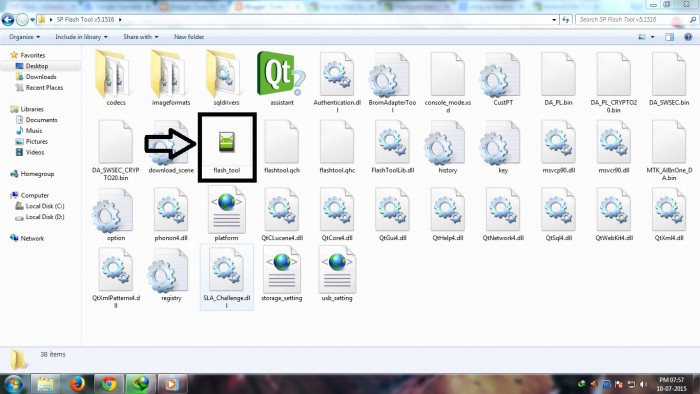
Step 2: Once done, you should download the SP Flash tool and extract it on your PC and move on to launch the Flash_tool.exe file to open the SP Flash tool window.
download sp flash tool
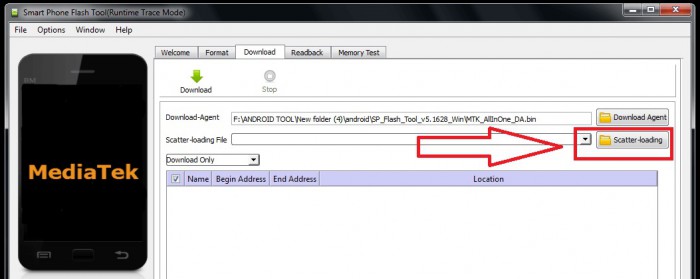
Step 3: Now, on the SP Flash tool window, click on “Download” and select “Scatter loading”.
scatter loading
Step 4: The last step would be to locate the file downloaded by you and click “Open” and then finally, select “Download” on the SP Flash tool window.
load the downloaded file
After completing the above steps, connect your dead device to the PC with a USB cable and wait for it to get recognized. The flashing process will take a few minutes to finish and then you will you will see a green circle indicating “OK Download”.
That's it! Now simply disconnect your phone and wait for it to reboot.

Part 4: How to flash Nokia dead phone with Phoenix tool?

Phoenix tool, better known as PhoenixSuit, is a tool similar to SP False tool and Odin. It works very well with Nokia phones and is the best answer to “How to fix dead Android phone?”, “How to flash dead Android phone using PC?”, etc.
Let's look at the steps of flashing Nokia dead phone with Phoenix tool.
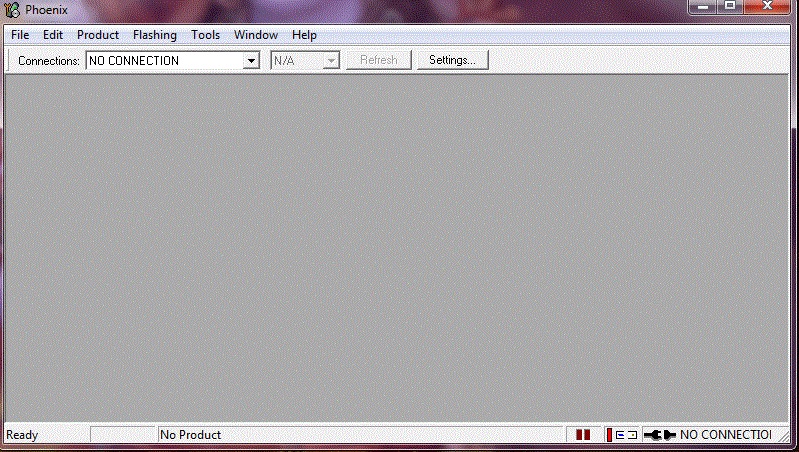
First, download and install Nokia PC Suite driver on your PC. Then you will need to download PhoenixSuit tool and then launch it.
nokia pc suite
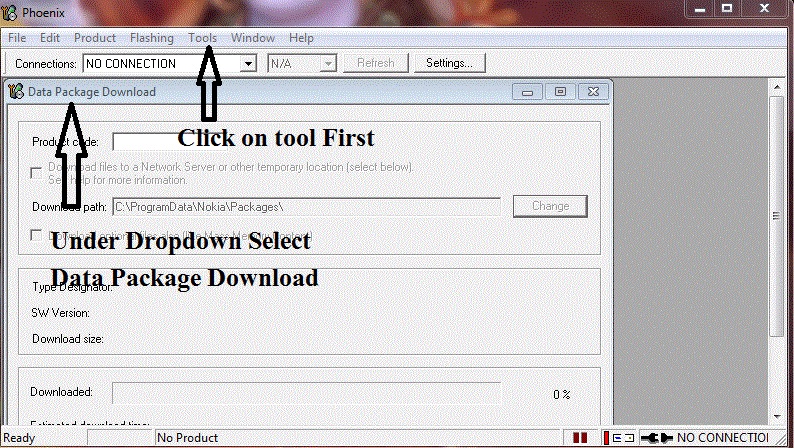
Now, on the toolbar, click “Tools” and select “Data Package Download” from the drop-down list.
data package download
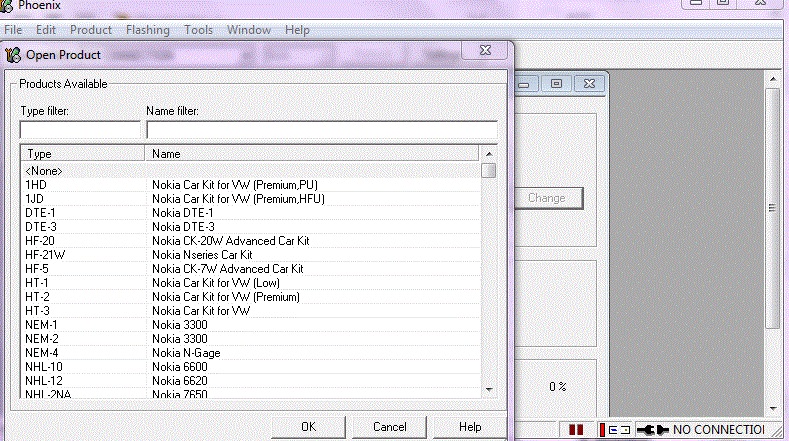
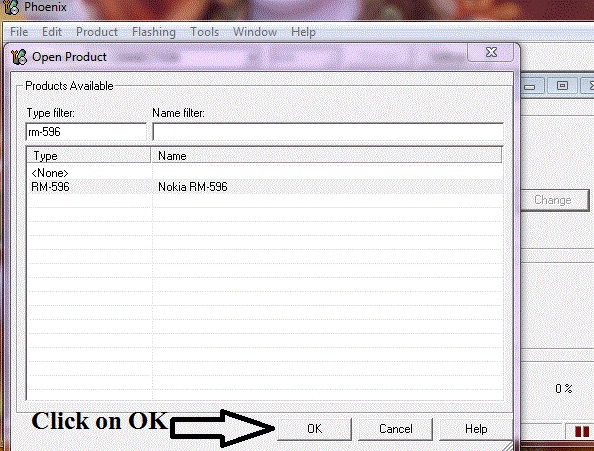
Then move to download the firmware for your dead Nokia phone and save it in a new Folder. Once done, go back to the Phoenix tool window and click on “File” and select “Open Product”.
open product
Simply, feed in the details and then click “OK”.
check the details
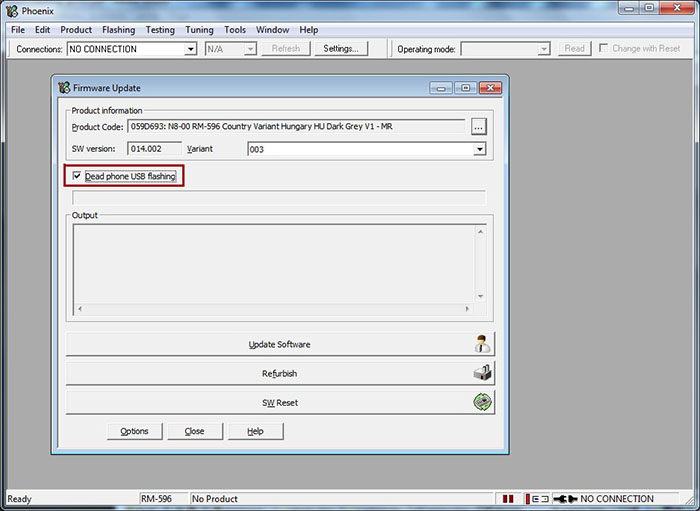
After this, click on “Flashing” and select “Firmware update” and then browse to select the appropriate product code and then click “OK” again.
Then move on to select “Dead Phone USB Flashing” from the Firmware Update Box.
dead phone usb flashing
Lastly, just click on “Refurbish” and connect your phone to the PC using a USB cable.
That was it, the flashing process may take up to a few minutes after which your dead Nokia phone will restart automatically.
A dead Android phone might be the cause of worry but the techniques given above to flash your dead Android device safely are very helpful. These methods have been tried and tested by users all over the world and thus, we recommend them to you. If your phone is dead or has become unresponsive, do not panic. Depending on your phone’s brand, here are ways to guide you about how to fix the dead Android phone and how to flash dead Android phone using PC.
Carefully follow the instructions given and you will be able to reboot your dead Android phone successfully.

          with Bem T. on the system everything is ok

Been T. - System Repair (Android)

One click solution to flash Samsung Galaxy
  • High success rate in fixing Samsung Android devices.
  • All latest Samsung devices are supported by this software.
  • One click operation of this tool helps you how to flash Samsung Galaxy easily.
  • Being very intuitive, it doesn’t need you to be tech savvy to use this software.
  • It is one of its kind and first one-click Android repair software in the market.


Read more ...

2023- 85 RRI Application Form Out

Read more ...

NDLEA RECRUITMENT PORTAL IS OPEN AGAIN TO RECIEVE APPLICATIONS.


NDLEA Recruitment Portal Is open again

The official National Drug Law Enforcement Agency (NDLEA) recruitment portal was inaccessible and returning an error message stating “500 Internal Server Error”. This issue is affecting all applicants across Nigeria.

Large Number of Applicants Crash Website

The NDLEA recruitment website crashed due to the high volume of applicants trying to access it. As of Monday morning, the website was down and displaying a “502 Bad Gateway” message but now is open again to recieve applications. The recruitment process began on Sunday, March 12, 2023, and will run for two weeks.

Teach yourself computer, need to know more? Let's go.

NDLEA Recruitment Requirements and Guidelines

Applicants must be of Nigerian origin by birth and possess a national identity number (NIN). Graduates of secondary schools, polytechnics, and universities can apply online, and computer literacy is an added advantage for all cadres.

Applicants must also be medically fit and provide a certificate of medical fitness from a government hospital. Candidates applying for the role of “superintendent cadre” must be between 20 and 35 years old, while the age limit for “narcotic agent cadre” and “narcotic assistant cadre” is 30 years and not less than 18 years at the point of entry.

Persons over 40 years applying for the role of “medical doctors” and “articulated vehicle drivers” will be considered. Medical and allied professionals must possess a current practicing license, and lawyers must have been called to the bar.

Applicants must be drug-free and of good character, with no criminal convictions. They must use their personal email address and phone number when submitting their applications online.


Go to previous page to see the procedures for the recruitment.

Read more ...

How does Paypal Work in Nigeria | How to send and receive money through PayPal in Nigeria


How does Paypal Work in Nigeria | How to send and receive money through PayPal in Nigeria

PayPal is an online payment service available in Nigeria. Users can transfer, receive, and withdraw money through PayPal. It is accepted in over 200 countries worldwide. Nigerian users were previously restricted from using PayPal.

Nigerians can now open personal accounts to send money. Business accounts are available for Nigerians to receive money. PayPal Business account is only open to businesses, entrepreneurs, and freelancers. Nigerian business accounts can receive payments through their website.

Invoices can be created and payments requested through the business account.  PayPal has made it easier for Nigerians to conduct business online.

Does Paypal work in Nigeria?
PayPal is available for use in Nigeria. Nigerians can send and receive money through PayPal. It can be used for online transactions in Nigeria. Nigerian PayPal accounts have certain limitations.

In the past, Nigerians were restricted from using PayPal. Business accounts are available for Nigerian users to receive money. Nigerian PayPal accounts can be linked to bank accounts. Nigerian PayPal accounts may have limitations on withdrawal amounts.

It has made it easier for Nigerians to conduct international transactions. PayPal’s availability in Nigeria has opened up new opportunities for e-commerce.

If you want to get Bem T Celestial Products and services click here.

Types of PayPal accounts in Nigeria
There are two types of PayPal accounts available to Nigerians.

Personal Account
Personal accounts are free to set up.
This account allows you to send money to family and friends.
You can use a personal account to pay for goods and services online.
There are limits on the amount of money you can receive.
Linked to a debit or credit card, you can make transactions.
You can link your personal account to your bank account.
PayPal offers buyer protection for personal account transactions.
This can be used for international transactions.
Personal accounts can be upgraded to a business account if needed.

Business Accounts
Business accounts allow businesses to receive payments online.
Business accounts can be used to create and send invoices.
This provides tools to add payment solutions to your website.
Business accounts offer custom branding for payment pages.
There are options for accepting payments in multiple currencies.
Businesses can access analytics and reporting features.
Business accounts have higher monthly transaction limits.
PayPal offers seller protection for business account transactions.
Business accounts can be linked to a bank account for easy withdrawal.
PayPal offers customer service support for business accounts.

Requirements for Setting up a PayPal Personal Account in Nigeria
Legal name on birth certificate and documents required.
An email address is required to open a personal account.
A strong password is necessary to secure your account.
Only Visa and MasterCard are accepted for debit/credit card linking.
Your address must be provided during the registration process.
You will need to provide accurate information to open your account.
You may need to provide additional documentation for verification purposes.
Personal accounts have limits on the amount of money you can receive.
You can link your personal account to a bank account for easy withdrawal.
Personal accounts can be used to make international transactions.

Requirements for Setting up a PayPal Business Account in Nigeria
Legal name required for opening a business account.
A registered business name is necessary for opening a business account.
Business information, such as type and size, will be required.
A government-issued ID card, preferably an international passport, is necessary.
A valid email address and phone number must be provided.
Providing truthful and accurate information is crucial for keeping your account.
Business accounts offer advanced payment and reporting tools.
PayPal offers seller protection for business account transactions.
Business accounts have higher monthly transaction limits.
PayPal provides customer service support for business accounts.
Step-by-Step Process to Open a PayPal Account in Nigeria
Go to the PayPal website and click “Sign Up”.
Choose either “Personal” or “Business” account type.
Fill out the registration form with your personal or business information.
Verify your email address by clicking on the confirmation link.
Link a valid Visa or Mastercard debit/credit card to your account.
Add your bank account for easy withdrawal.
Provide additional documents for verification, if requested.
Start sending and receiving money with your PayPal account.
Use PayPal to pay for online purchases on websites that accept it.
Ensure that you follow PayPal’s terms of service to avoid account limitations.

Do you want to know how to unlock any mobile phone? Get your ebook here
Learn How to Send Money Using PayPal in Nigeria.

Log in to your PayPal account.
Click on “Send & Request” on the top menu.
Enter the recipient’s email address or mobile number.
Enter the amount you want to send.
Choose the currency and payment type (goods/services or friends/family).
Add a note, if necessary.
Review the payment details and click “Send Payment Now”.
Confirm the payment by entering your password or using your fingerprint.
You will receive a confirmation email with the transaction details.
The recipient will also receive an email notification of the payment.

Learn How to Receive Money Using PayPal in Nigeria
Log in to your PayPal account and click “Send & Request.”
Enter the recipient’s email address and the amount you want to send.
Choose the funding source (bank account or credit/debit card).
Review the details and click “Send Payment Now.”
The recipient will receive the money instantly in their PayPal account.
You can also send money to someone who doesn’t have a PayPal account.
To do this, enter their email address and they’ll be prompted to create an account to receive the money.
You’ll be charged a small fee for sending money internationally.
You can also set up automatic payments for recurring expenses.
PayPal offers buyer protection for eligible transactions

Does PayPal work in Nigeria?
Yes, PayPal works in Nigeria.

What are the limitations on Nigerian PayPal accounts?
Personal accounts can only send money while Business accounts can send and receive money with certain conditions

Can Nigerians withdraw money from PayPal to their local bank account?
Yes, Nigerians can withdraw money from PayPal to their local bank account.

What fees are associated with using PayPal in Nigeria?
There are fees associated with certain transactions, such as receiving payments, converting currency, and withdrawing money to a bank account.

Is PayPal customer support available in Nigeria?
Yes, PayPal provides customer support in Nigeria through its website and email support.

How long does it take to open a PayPal account in Nigeria?
Opening a PayPal account in Nigeria takes only a few minutes, provided you have all the required information and documentation.

Read more ...

NDLEA Recruitment Portal Is Down


NDLEA Recruitment Portal Is Down

The official National Drug Law Enforcement Agency (NDLEA) recruitment portal is currently inaccessible and returning an error message stating “500 Internal Server Error”. This issue is affecting all applicants across Nigeria.

Large Number of Applicants Crash Website

The NDLEA recruitment website has crashed due to the high volume of applicants trying to access it. As of Monday morning, the website was down and displaying a “502 Bad Gateway” message. The recruitment process began on Sunday, March 12, 2023, and will run for two weeks.

Teach yourself computer, need to know more? Let's go.

NDLEA Recruitment Requirements and Guidelines

Applicants must be of Nigerian origin by birth and possess a national identity number (NIN). Graduates of secondary schools, polytechnics, and universities can apply online, and computer literacy is an added advantage for all cadres.

Applicants must also be medically fit and provide a certificate of medical fitness from a government hospital. Candidates applying for the role of “superintendent cadre” must be between 20 and 35 years old, while the age limit for “narcotic agent cadre” and “narcotic assistant cadre” is 30 years and not less than 18 years at the point of entry.

Persons over 40 years applying for the role of “medical doctors” and “articulated vehicle drivers” will be considered. Medical and allied professionals must possess a current practicing license, and lawyers must have been called to the bar.

Applicants must be drug-free and of good character, with no criminal convictions. They must use their personal email address and phone number when submitting their applications online.

Read more ...

NDLEA 2023 RECRUITMENT


The National Drug Law Enforcement Agency (NDLEA) said it has officially opened a recruitment exercise for qualified Nigerians who are interested in joining the organisation.
  
NDLEA said this in a statement on Friday and disclosed that the application runs from March 12 to April 8, 2023.

It also stated in the tweet that graduates of secondary schools, polytechnics and universities can apply online with the application open for only two weeks.

“Applicants must be of Nigerian origin by birth and possess a national identity number (NIN) while computer literacy will be an added advantage for all cadres,” NDLEA said.

“Applicants are also required to tender all certificates at the time of recruitment as any other qualification presented subsequently will not be valid for career progression in the agency.”

NDLEA said “applicants must be medically fit and must produce a certificate of medical fitness from a government hospital.

“Candidates applying for the role of “superintendent cadre” must not be less than 20 years or more than 35 years while the age limit for “narcotic agent cadre” and “narcotic assistant cadre” is 30 years and not less than 18 years at the point of entry.”

The agency noted that “persons over 40 years applying for the role of “medical doctors” and “articulated vehicle drivers” will be considered.

“Medical and allied professionals must possess current practising licences while lawyers must have been called to bar.

“Applicants must be drug-free and also be of good character and must not have been convicted of any criminal offence.

“Applicants must use their personal email address and phone numbers when submitting their applications online.

“Qualified candidates are required to visit the NDLEA website at www.ndlea.gov.ng, click on careers and read the instructions carefully.”

Read more ...

Bottom Ad [Post Page]